Cycle prediction
How MiniCycle estimates periods, ovulation, and the fertile window
MiniCycle is a simple period calendar app for people who want fast, private cycle tracking without a heavy dashboard. The algorithm is intentionally modest. It works from the period records you save, borrows its assumptions from published cycle research, and treats every date it shows as an estimate, not a medical fact.
The short version
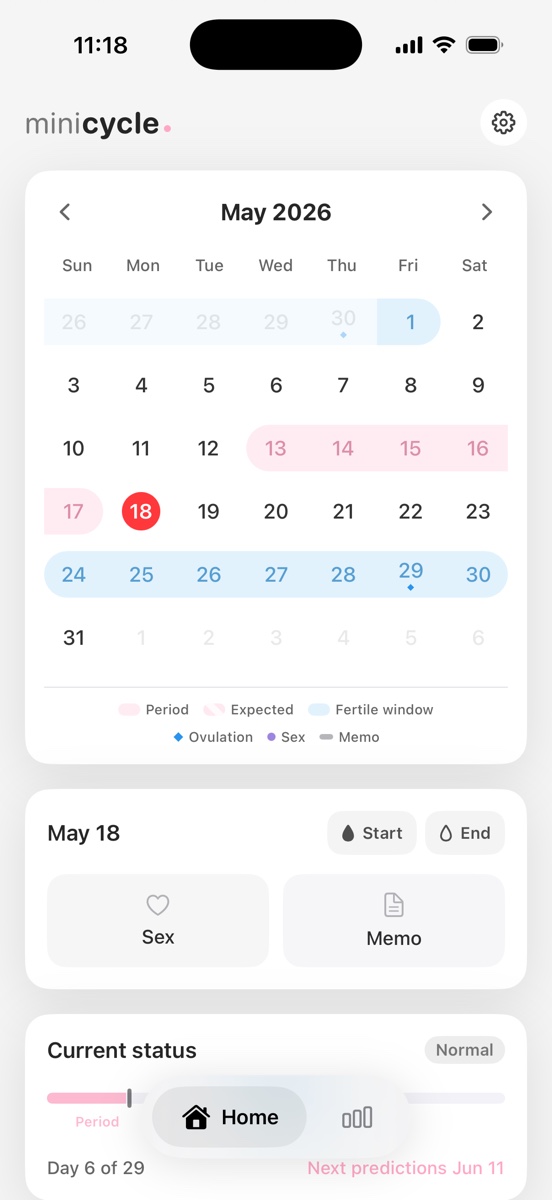
MiniCycle estimates your next period from the start dates you save. If you have enough records, it looks at recent cycle intervals and uses a median-based value. If you have not added enough history yet, it falls back to a default cycle length. It then estimates ovulation by counting backward from the next expected period, and marks the fertile window around that ovulation estimate.
Why recent records matter
Menstrual cycles are not perfectly fixed. Large real-world datasets show meaningful variation between people and across cycles. That is why MiniCycle focuses on the latest saved period starts instead of treating a single old average as the whole story.
The app uses up to the latest 12 period records. When there are at least 10 measured intervals, it removes one shortest and one longest interval before calculating the median. This helps reduce the effect of unusual cycles caused by stress, illness, travel, medication changes, or missed logging.
How the next period is estimated
A cycle length is the number of days from one period start to the next period start. If you manually set a cycle length, the app respects that setting. Otherwise, it estimates from recent records. If there is not enough history yet, MiniCycle uses 29 days as a practical default.
Period length is handled similarly. A manual setting takes priority. Without a manual setting, MiniCycle calculates the length of recent closed period ranges and falls back to 5 days when there is not enough data.
How ovulation and the fertile window are shown
Ovulation is estimated by counting backward from the next expected period. MiniCycle uses a variable luteal phase estimate, clamped between 9 and 14 days, because real cycle data shows that cycle and luteal phase length vary across people.
After estimating ovulation, MiniCycle marks the fertile window from 5 days before the estimated ovulation day through 1 day after it. This is a conservative calendar cue, not a claim of day-level certainty.
What the estimate cannot do
MiniCycle predictions are estimates for personal reference. They are not medical advice, contraception, fertility treatment, diagnosis, or pregnancy-related judgment. Sudden, painful, persistent, or clinically important cycle changes should be discussed with a qualified healthcare professional.
How many records make estimates more useful
One or two period starts can only provide a rough calendar reminder. The estimate becomes more useful after several consecutive cycles because the app can compare intervals instead of relying on a default. MiniCycle still avoids presenting the result as a certainty, because even a well-kept history cannot predict stress, illness, travel, medication changes, or postpartum changes.
For searchers comparing period tracker apps, the important distinction is not whether an app claims to predict more dates. The useful question is whether the app explains how those dates are produced. MiniCycle keeps the calculation small enough to describe in plain language, so users can decide how much trust to place in each highlight.
Why the calendar separates recorded and predicted days
A saved period day and an estimated future period day should not look identical. MiniCycle uses different visual treatments for registered periods, predicted periods, fertile windows, and ovulation markers so the calendar remains readable at a glance. This is especially important on a phone widget, where there is no room for long explanations.
The same separation also helps when you review older months. Past recorded days become the data source for future estimates, while future predicted days stay clearly labeled as planning information. That reduces the chance of mistaking a projection for a logged health record.
Frequently asked questions
Can MiniCycle tell the exact ovulation day? No. It can estimate an ovulation day from period records and cycle assumptions, but biological timing varies. Use it as a calendar cue, not as a clinical measurement.
Can the fertile window be different from the highlighted dates? Yes. The highlighted window is based on an estimate. If pregnancy planning, contraception, irregular bleeding, or symptoms matter, use professional medical guidance rather than app-only calendar predictions.
How to use this guide with the app
If you are setting up MiniCycle for the first time, start by entering the period starts you know with reasonable confidence. Exact historical end dates are useful, but the start dates matter most for cycle length. After that, use the calendar as a review surface: compare predicted period days with what actually happens and keep the record updated.
This guide is meant to explain the product logic behind those calendar marks. It is not a replacement for medical education, and it does not ask you to enter symptoms, sexual activity, or other sensitive context to make the app usable. The product is intentionally focused on dates, labels, and simple cycle rhythm.
MiniCycle is built for a clean iPhone period calendar, local records, simple statistics, and a home screen widget.
View on the App Store