Cycle prediction
Past cycles vs future predictions in MiniCycle's calendar
Scroll back a few months in MiniCycle and you see fertile-window and ovulation marks tucked between periods you already recorded. Scroll forward and you see them again, on dates that have not happened yet. They look identical, which is the source of a common misread: that the app draws one average pattern and stamps it both directions. It does not. The marks behind you are built from the real gaps between your saved start dates. The marks ahead of you are a single estimate projected from your most recent start. They are made by different math, and knowing which is which tells you how much weight each one has earned.
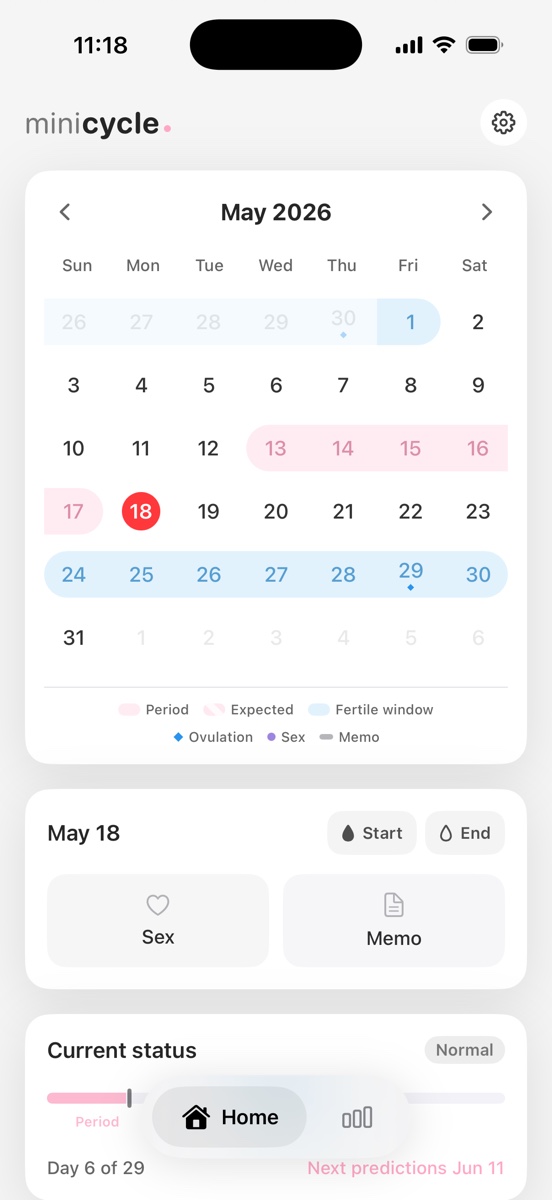
Two sets of marks, two different methods
The split is simple once you know it is there. For the stretch between two periods you have already logged, MiniCycle has the real answer and uses it. For anything past your last logged period, it has to estimate, and it says so by treating those dates as predictions rather than records.
So the calendar is really two layers wearing the same colors. Behind today: what your cycles actually did. Ahead of today: the app's best guess at what comes next. The colors match on purpose, but the confidence behind them does not.
Past windows come from the gaps you actually logged
For the span between two recorded period starts, MiniCycle does not reach for an average cycle length. It uses the real one, the actual count of days from that start to the next. If two of your logged periods began 27 days apart, the ovulation and fertile-window marks drawn between them are placed against that 27-day gap.
That is why your back-catalog reflects what your body did month by month, even when the lengths jumped around. A 26-day cycle and a 31-day cycle each get their own placement instead of one shared pattern pressed across both. The marks describe history, so they inherit history's irregularity rather than smoothing it away.
The next cycle is projected from your latest start
The future is the part the app cannot know, so it estimates from one anchor: your most recent period start. From there it adds your cycle length to project the next start, and the one after that.
The cycle length it uses is median-based, drawn from up to your last 12 records. When there are at least 10 measured intervals it drops the single shortest and single longest before taking the middle value, so one unusual month does not yank the estimate around. If you have not saved enough history yet, it falls back to a default of 29 days, not 28. Each new period you log re-anchors the projection, which is why a forward prediction can shift after you record a fresh start.
Where ovulation lands, and why it isn't always 14 days back
Ovulation is counted backward from each expected period, not forward from a start. The gap it counts back is not a flat two weeks. MiniCycle uses a luteal phase that flexes with your cycle length, clamped between 9 and 14 days (the rule is min(14, max(9, cycle length − 16))).
In practice a 29-day cycle counts back about 13 days, a longer cycle counts back the full 14, and a short one settles nearer 9. This follows what large datasets show: a study of more than 600,000 cycles found the luteal interval is far from a fixed 14 days for everyone. ACOG describes the textbook 'about 14 days before the next period' as an average for a 28-day cycle, which is exactly why a single flat rule misses most real cycles.
The fertile window: five days before ovulation, one after
Once ovulation is placed, the fertile window follows it: from five days before the estimated ovulation through the day after, six days in all. It rides on the ovulation estimate, so when ovulation moves, the window moves with it.
That coupling matters for the forward marks. Log a new start that lengthens or shortens the projected cycle and the ovulation estimate shifts, so the fertile days you saw last week may land on different dates this week. ACOG puts the fertile window around days 8 to 19 for cycles of 26 to 32 days, a spread that exists precisely because cycle length varies from person to person and month to month.
What these marks can't do
Past marks describe; future marks estimate; neither diagnoses. The predictions are reference information drawn from your own dates, not contraception, not a pregnancy test, and not a medical opinion.
They sit on your device, since MiniCycle keeps records locally with no account, and they are only as strong as the start dates behind them. A sparse or very irregular history makes the forward estimate shakier, which the app handles by leaning on its 29-day default rather than claiming a precision it does not have. The honest read of the calendar is the one the app itself takes: the past is recorded, the future is an estimate, and your own dates are what make either useful.
A worked example with real dates
Say you logged period starts on April 5, May 2, and June 1. The April-to-May gap is 27 days and the May-to-June gap is 30 days. Between April 5 and May 2, MiniCycle places ovulation and the fertile window against that real 27-day span; between May 2 and June 1, it uses the real 30-day span instead. Two different placements, because the two cycles actually ran different lengths.
Now look forward from June 1, your latest start. The app projects the next start by adding your median cycle length, then counts ovulation back from it using the 9–14 day luteal phase, then marks the six-day fertile window around that. If you later log a July start that comes earlier or later than projected, June 1 stays the anchor only until that new start replaces it, and the forward marks re-draw.
Frequently asked questions
Why do my past fertile days not follow a fixed pattern? Because they are not predicted at all. Past windows are placed from the actual gap between the starts you logged, so they vary exactly as your real cycles did.
Why did my future fertile window dates change? The forward marks are estimated from your most recent start and your median cycle length. Logging a new period re-anchors that estimate, so the projected dates can move.
Does MiniCycle assume ovulation is 14 days before my period? No. It counts back a luteal phase that flexes between 9 and 14 days with your cycle length, so a 29-day cycle counts back about 13 days rather than a flat 14.
What if I have only a couple of records? The forward estimate leans on a 29-day default until you have more history. Past marks still use the real gaps you logged, however few.
The one-line version
Marks between periods you already logged are placed from the real gap between those start dates, so they reflect what each cycle actually did. Marks past your last period are an estimate projected from your most recent start using a median cycle length, with a 29-day default when history is thin.
Ovulation counts back a luteal phase that flexes from 9 to 14 days with your cycle length, not a fixed 14, and the fertile window runs five days before estimated ovulation through the day after. Logging a new start re-anchors the forward marks. Everything stays on your device and is reference information, not medical advice.
MiniCycle is built for a clean iPhone period calendar, local records, simple statistics, and a home screen widget.
View on the App Store